
For Indian manufacturing units
Where is my material? It should never take a walk to answer.
WIP360 shows every batch at every stage, who moved it and what it is worth, from one screen. Built for casting, machining and coating units that run on stages, challans and approvals.
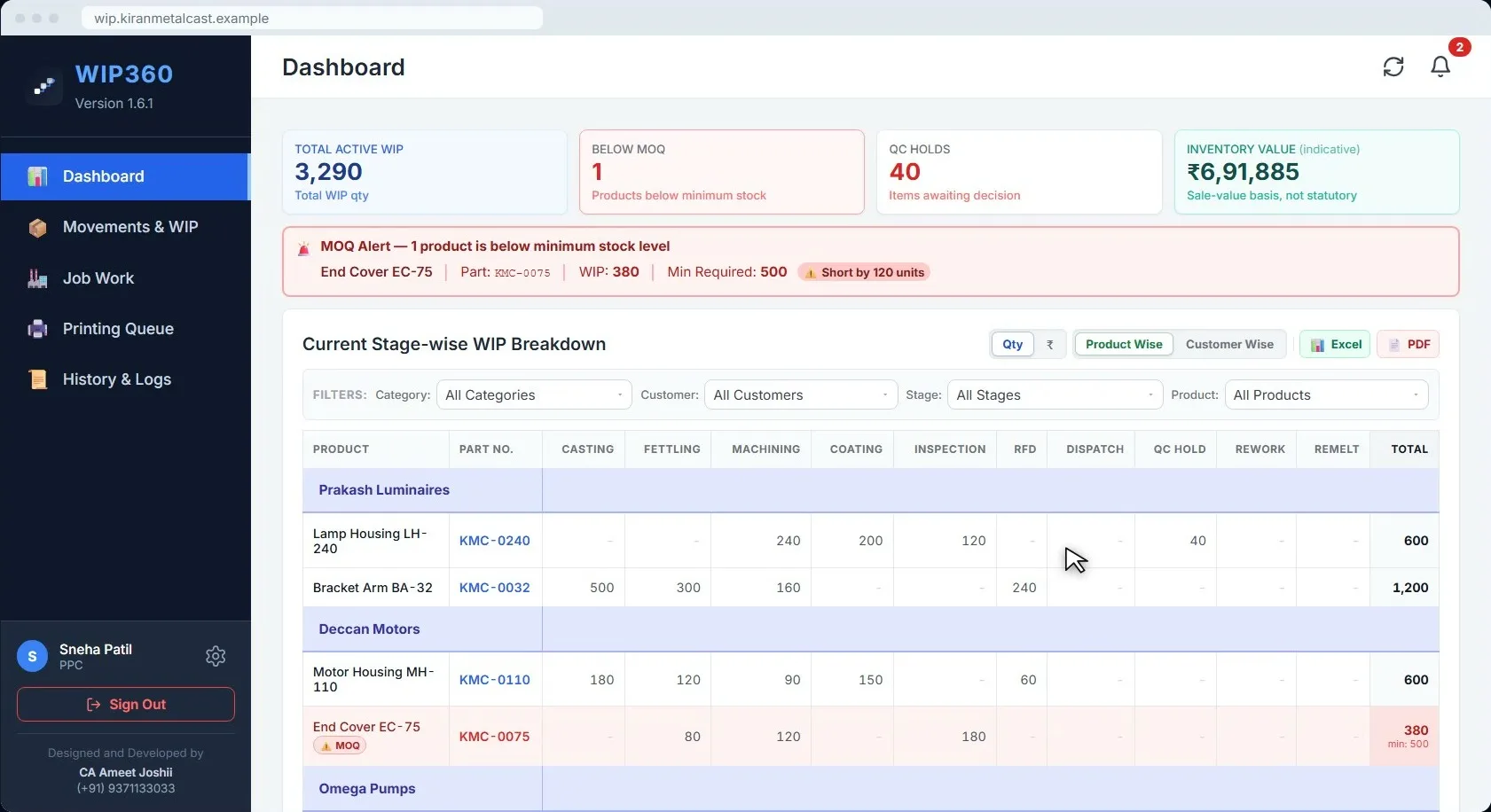
The dashboard: every product at every stage, grouped by customer, with the one product below minimum stock flagged.
- 9
- features in one app
- 2 people
- on every move: a maker and a checker
- 7 roles
- set by the user’s department
- 1 instance
- and database per unit, nothing shared
Three problems every plant knows
Three things heard on the floor, and what WIP360 does about each.
The demo opens with them: material nobody can locate, movements nobody signed for, and a WIP value guessed at month end.
“Where is my material right now? Three registers, two WhatsApp groups, and nobody is sure.”
Every batch at every stage, on one screen.
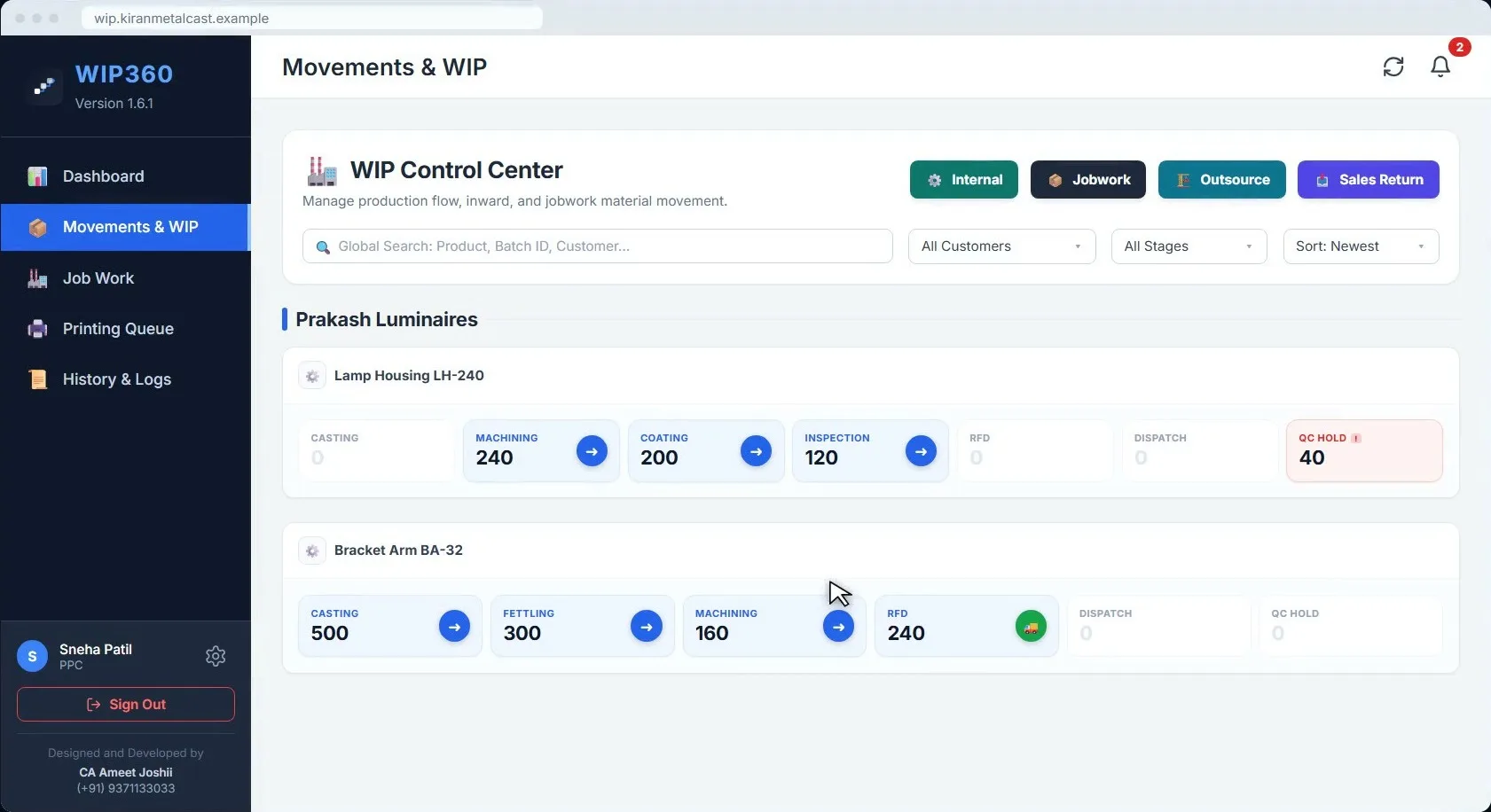
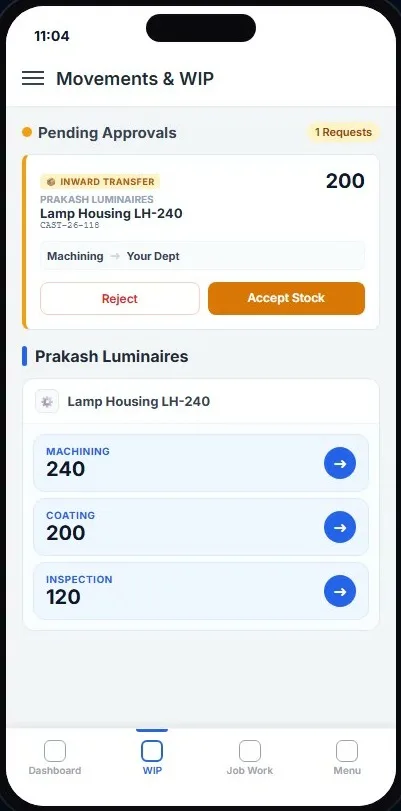
Each batch carries a quantity per stage, product by product and customer by customer. PPC sees where the lamp housings are without walking the floor: 240 at machining, 200 at coating, 120 at inspection, 40 on QC hold.
“Stock went from fettling to machining on Tuesday. Nobody knows who sent it, or who took it.”
Nothing moves until the receiving department accepts it.
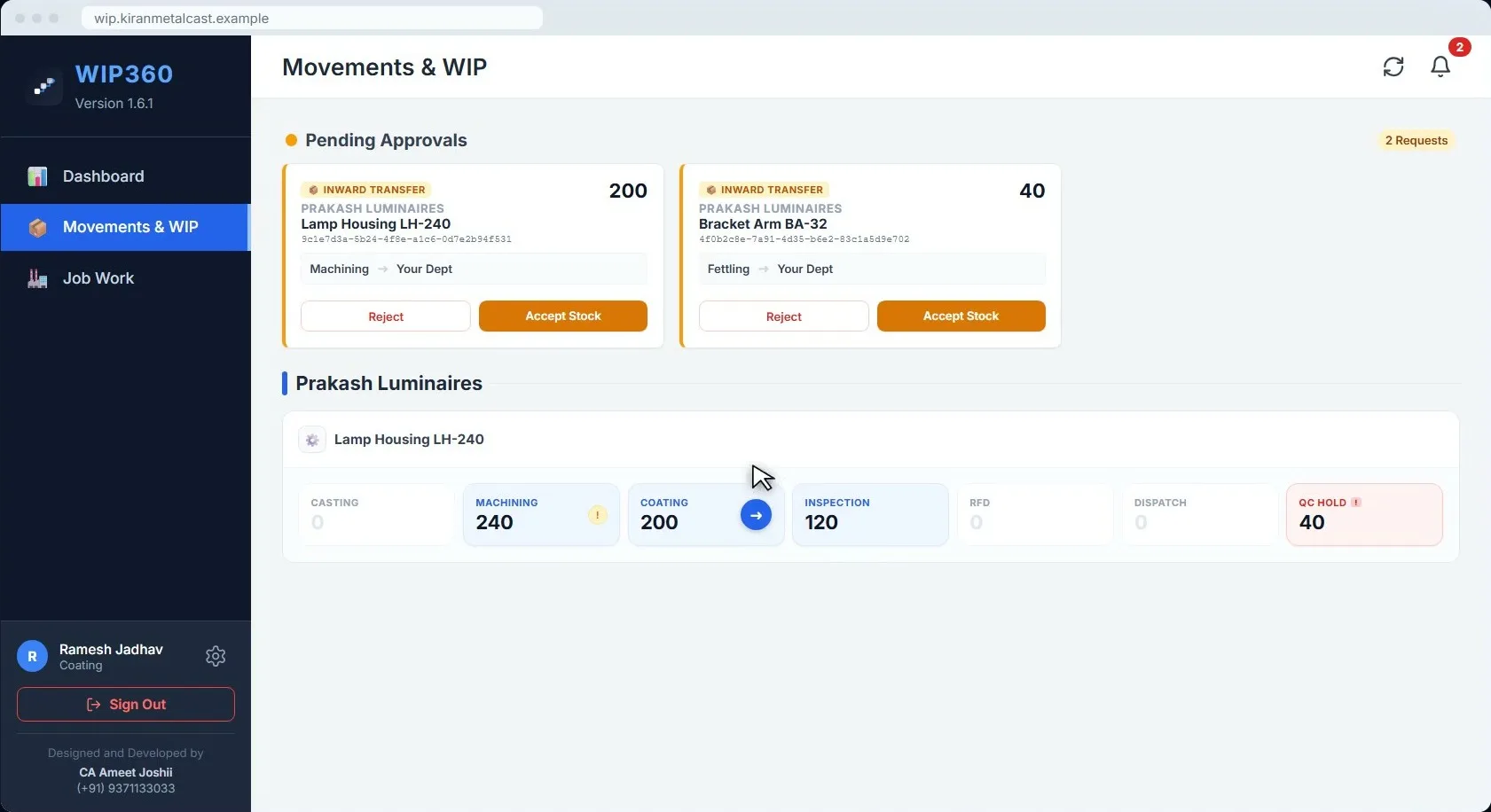
PPC raises the move; it reaches the next department as a request, not as stock. The supervisor there accepts it, or rejects it with a reason. The database refuses a request the stage cannot cover. Every move has a maker, a checker and a time.
“Finance asks for the WIP value at month end. We guess.”
WIP value as a calculation, any day of the month.
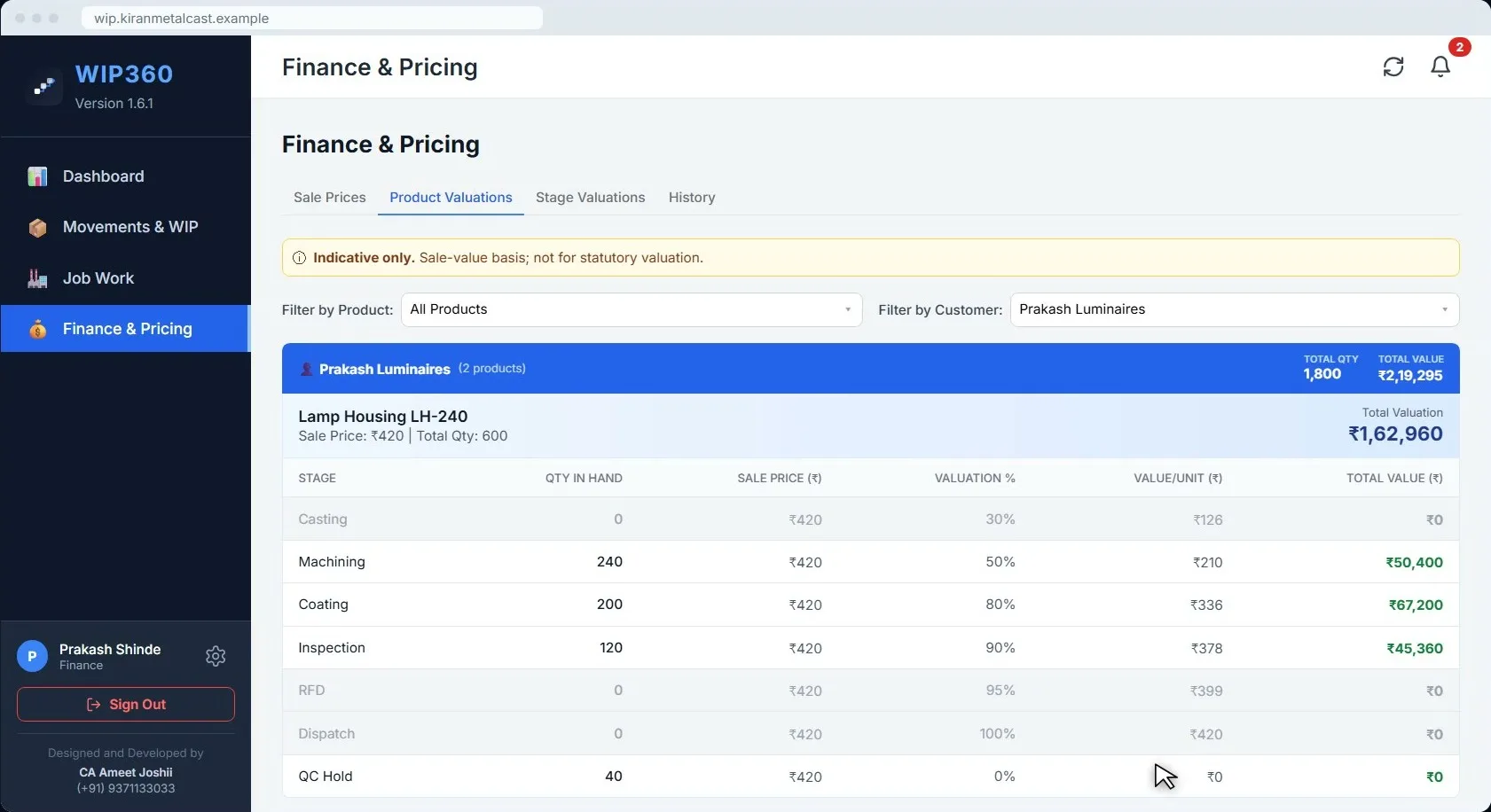
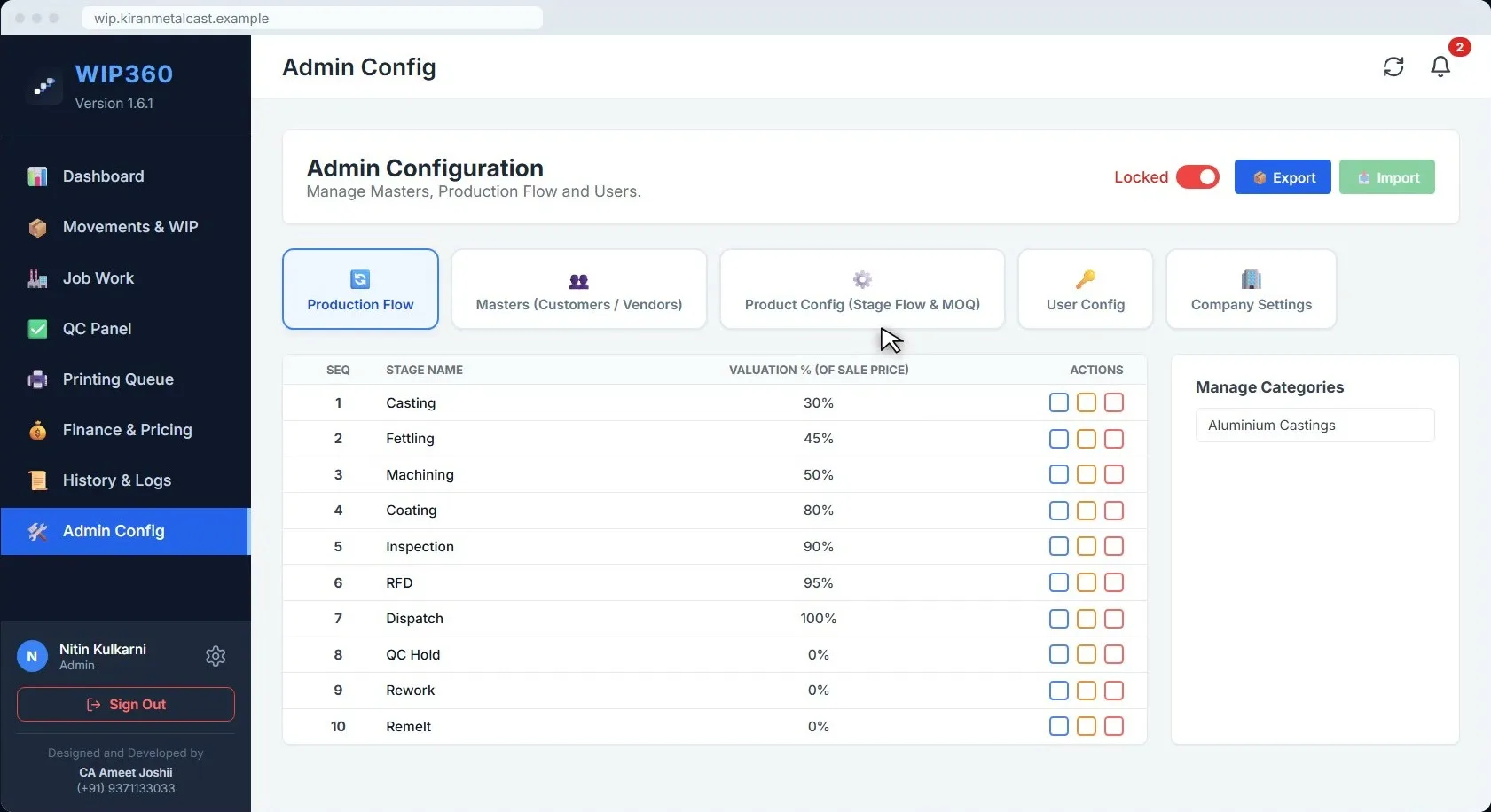
Each stage carries a share of the sale price that you set: 30% at casting, 50% at machining, 80% after coating. WIP360 multiplies it out product by product and stage by stage. The figure is indicative, on a sale-value basis, and the app says so.
Nine features, one system
Everything between casting and dispatch
Batches, movements, job work, quality, valuation and the record of who did what, in one app your departments share.
- Stage-wise WIP dashboardEvery product at every stage, in quantity or rupees, with Excel and PDF export.
- Approval-controlled movementsA maker and a checker on every transfer, QC pull, consumption and dispatch.
- Job work and sales returnsChallans out to vendors, partial returns back, and what is still pending.
- Quality controlQC hold decisions: rework or scrap, with the defect and a rejection card.
- Finance and valuationSale prices by product and customer, a valuation % per stage, and exports.
- Complete audit trailWho did what to a batch, when, and how many pieces.
- Role-based accessSeven roles, from Admin to Viewer, set by the user’s department.
- One app, every deviceCloud-based: Android, iOS, tablet or desktop, installable as an app.
- PrintingBin labels from a print queue, with bulk printing and reprint history.
- Every feature, with its screenThe screens are from the demo film: the app's own labels, buttons and statuses, on a fictional plant.See the features
Your flow, your rules
Your stages, in your order.
Admin sets the stages your plant runs, each with its share of the sale price, plus holding stages such as QC Hold, Rework and Remelt. Each product gets its own stage flow and minimum stock. Users are added by department, and the department sets the role.
Every move on record
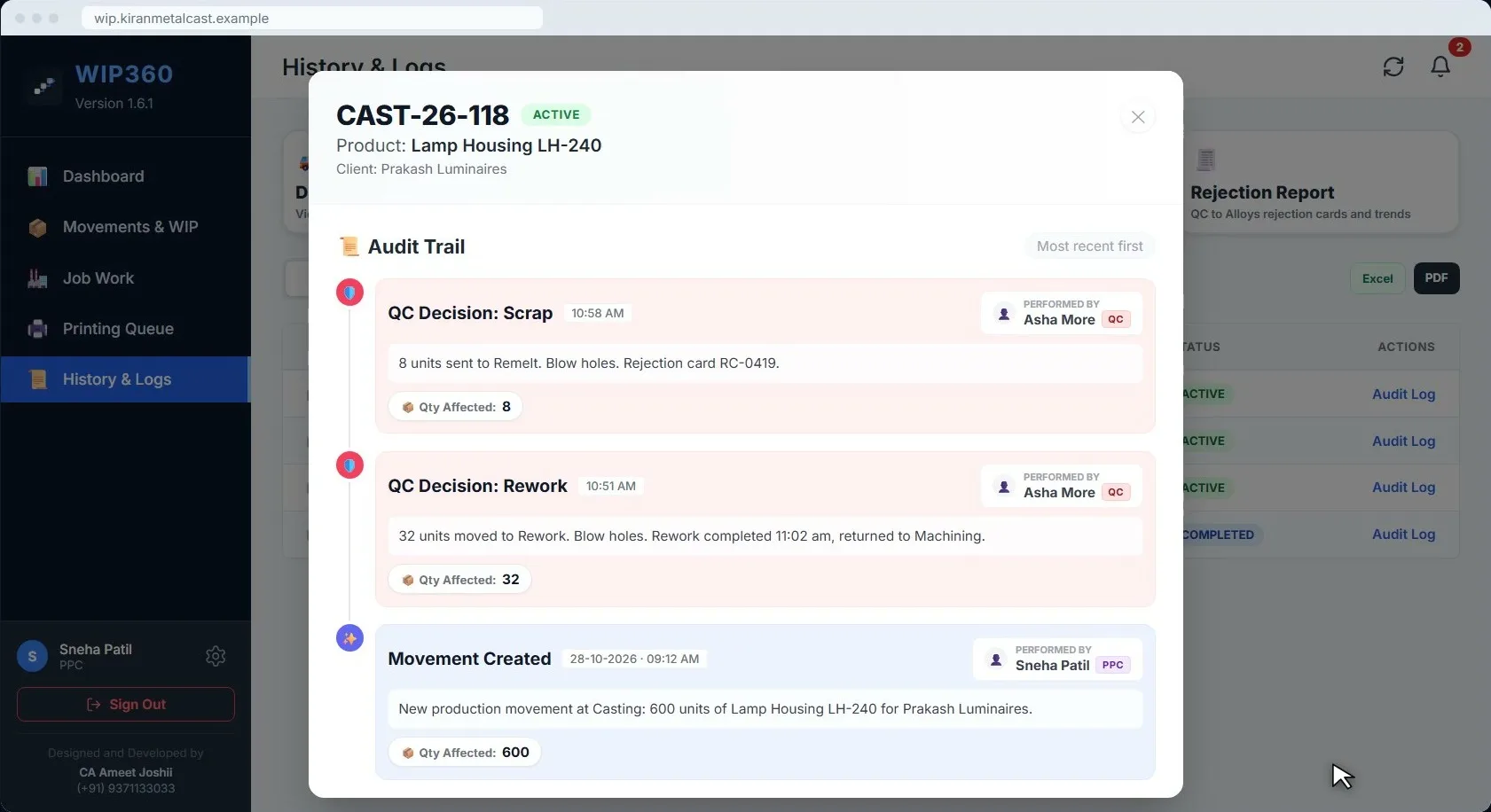
Who did what, when, and how many.
Each batch keeps its own audit trail: its creation, every QC decision and every rework, with the person, their role, the time and the quantity affected. History and Logs holds movement, dispatch and consumption history and the rejection report.
One app, every device
Accept the stock where it lands.
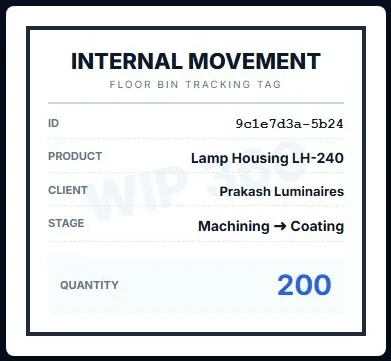
WIP360 runs in the cloud. Android, iOS, tablet or desktop: the same app and the same data, installable as an app, with a phone layout for the floor. The supervisor accepts an inward transfer at the stage, and the bin tag prints from the queue.
- Pending approvals on the phone
- Dashboard, WIP and Job Work in the bottom bar
- Floor bin tracking tags
- One private instance per unit
How it starts
Your own instance, set up in the app.
Every WIP360 deployment is a dedicated instance for one manufacturing unit: your own database, your own configuration, setup and support included. There are no per-user fees and no shared infrastructure. Ask for a quote for your unit.
- 1
Your own private instance
Every WIP360 deployment is a dedicated instance for one manufacturing unit: your own database, nothing shared with any other customer.
- 2
Guided first-run setup
An admin sets up the company profile and the first user directly in the app.
- 3
Configure your production flow
Add your stages and their valuation percentages, your products with their stage flow and minimum stock, your customers, vendors and users.
- 4
Go live
Start recording batches and movements. The dashboard, valuation and reports work from day one.
The demo
Four minutes, every feature on screen.
The film shows the three problems above and the fix for each, then walks through job work, QC, valuation, the audit trail and the admin settings. Nothing from YouTube loads until you press play.
Questions plants ask
Before the demo
The questions owners and plant heads ask first. Anything else, ask us directly.
Ask a questionCan WIP360 follow our own stages?
Yes. Admin sets your stages in your order, each with its valuation percentage of the sale price, plus holding stages such as QC Hold, Rework and Remelt. Each product has its own stage flow and minimum stock.
Who can move material?
PPC raises every transfer, QC pull, consumption and dispatch; the department on the other side accepts or rejects it, with a reason for a rejection. PPC cannot approve its own request, and a request the stage cannot cover is refused.
Is the WIP value a statutory valuation?
No. It is an indicative value on a sale-value basis: the quantity at each stage times that stage’s share of the sale price. It gives finance a figure built from the floor, any day of the month, and the app labels it as indicative.
Does it handle job work at vendors?
Yes. Material goes out on a challan to a vendor for a named process and comes back in full or in part, to the stage you choose. The register shows what is still out, by challan and by vendor.
Can supervisors use it on the shop floor?
Yes. WIP360 runs in the cloud and installs as an app on Android, iOS, tablets and desktops, with a phone layout for the floor. It needs an internet connection; it does not record movements offline.
Is our data shared with other customers?
No. Every unit gets its own instance and its own database. Nothing is shared with another customer.
Can we take reports out?
Yes. The dashboard table exports to Excel (CSV) and PDF as it stands; finance valuations and the QC rejection report export too.
How is it priced?
Per unit, with setup and support included and no per-user fees. Ask for a quote for your unit; prices are not published.
Next step
See it on your own production flow
Tell us your stages, your products and how material moves today, and we will show you WIP360 doing that.